
For the last decade, we designed one website and hoped it worked for everyone. We called it “Responsive Design.” But why should a 60-year-old using a tablet see the same layout as a 15-year-old gamer on a VR headset? The answer is: they shouldn’t.
From Responsive to Generative
Generative UI (GenUI) takes personalization to the structural level. Instead of pre-made templates, AI constructs the interface on the fly.
- For the Senior User: The site automatically increases contrast, enlarges buttons, and simplifies navigation.
- For the Power User: The site enables keyboard shortcuts, dense data tables, and dark mode instantly.
Real-Time Layout Adaptation
This isn’t just A/B testing; it is “N=1” design. The website detects the user’s intent and context. If a user is rushing (detected via erratic mouse movement or rapid scrolling), the GenUI strips away decorative elements and highlights the “Buy Now” or “Contact Support” buttons.
The SEO Implications of Fluid Design
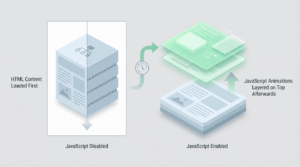
How does Google rank a page that looks different for everyone? In 2026, search engines have evolved to crawl the “Core Content API” rather than the visual DOM. As long as the underlying data is structured, the fluid layout does not hurt rankings—it actually boosts them by improving engagement metrics.
Tools to Build GenUI
You don’t need to code these variations manually. Tools like Framer AI 5.0 and Vercel Gen allow developers to define “constraints” rather than pixel-perfect positions, letting the browser render the optimal layout for the specific moment.